
Full Guide to Logging into Lotus365: A Step-by-Step Guide
Table of Contents
Many people use Lotus365 login to play games and bet online because it’s fun and they can win money. This full guide will show you how to log in to the official Lotus365 platform, whether you’re a new user or have forgotten your login information.
What is Lotus365?
Lotus365 is an online gaming site with many fun options, such as casino games, sports betting, and live predictions. The platform has made a name for itself as “Most Trusted Since 2015” and has celebrity endorsements, which makes it a well-known brand in the world of online gaming.
How to Log In Step by Step
Step 1: Go to the Official Login Page
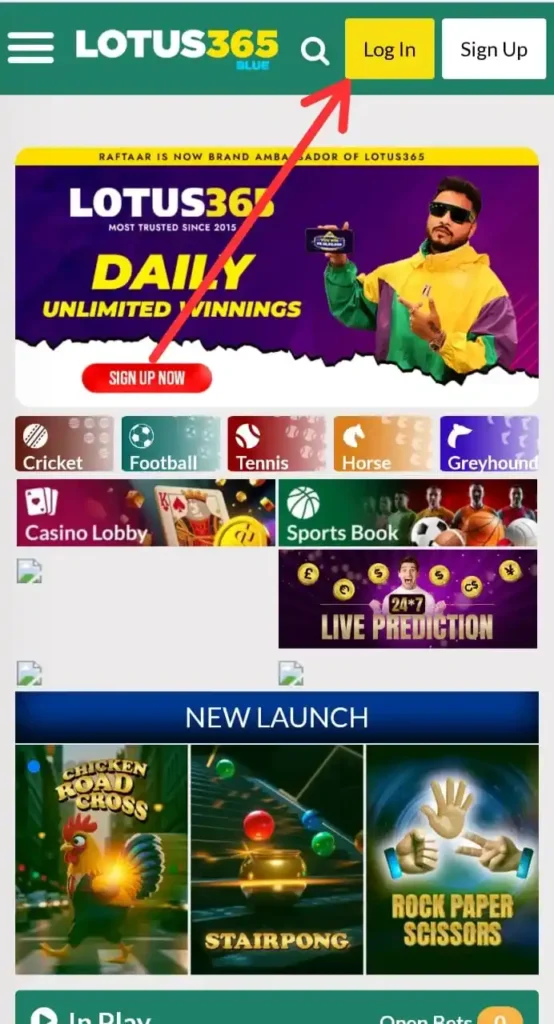
The main dashboard will greet you when you go to the Lotus365 website. To start the process of logging in:
- Find the Login Button: The homepage has a big yellow “Log In” button in the top right corner. **Click on “Login”:** This will take you to the official login page, where you can enter your information.
The login screen is easy to use and looks good with the Lotus365 brand’s green and yellow colour schemes.
Step 2: Type in your login information
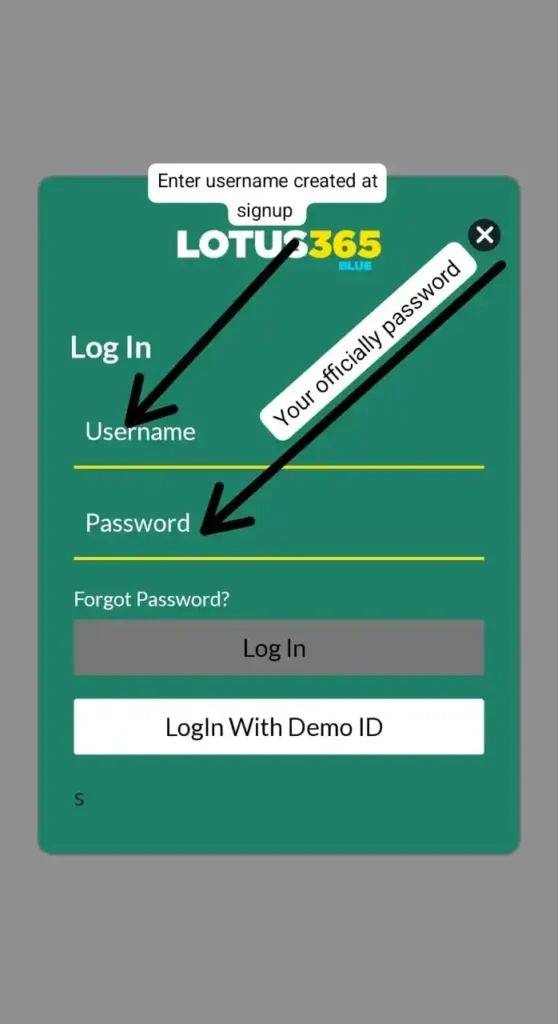
When you get to the login page, you’ll see two main fields to fill out:
- Username Field: Type in the username you made when you signed up. – Password Field: Type in the password for your account.
Important Information:
- Please use the username you created during sign-up, rather than your email or phone number. – Passwords are case-sensitive, so make sure you use the correct capitalization.
- Users who want to try out the platform before making an account can also use the “Login With Demo ID” option.
Step 3: What if you forgot your password? Not a problem!

Lotus365 login makes it easy to get your password back if you’ve forgotten it:
- Click the “Forgot Password?” link below the password field on the login page. Type in your mobile number. You will be asked to enter the phone number linked to your account.
- Choose Country Code: Be sure to pick the right country code (+91 for India)
- Get OTP: Click the green “GET OTP” button to get a password that can only be used once.
The system will show you a helpful message that says, “If you forget your password, enter your mobile number to get an OTP.” Then it will send you to a page where you can make a new password.
Step 4: Check the OTP and reset the password
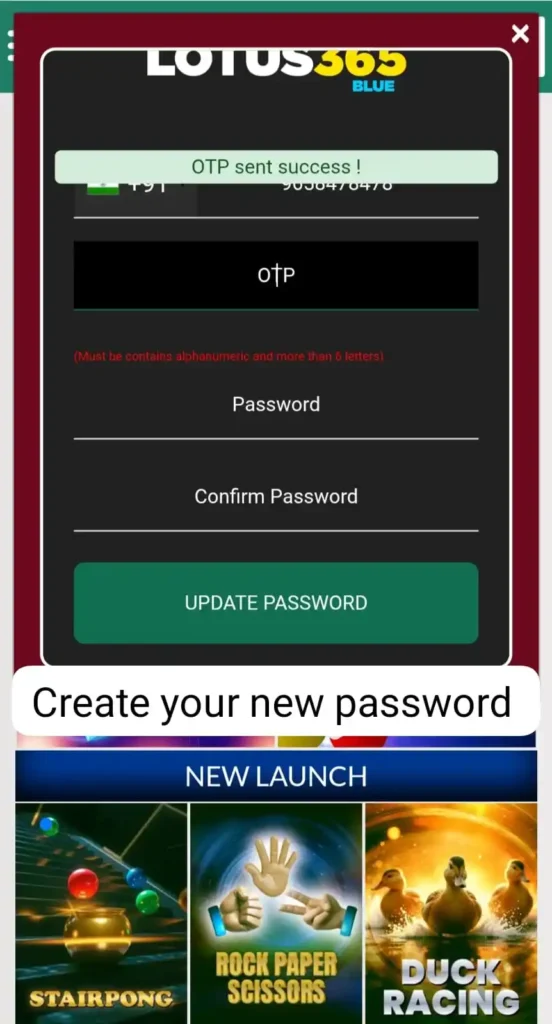
After you ask for an OTP, you’ll see a screen that says:
- OTP Sent Successfully: The system will inform you that the OTP has been sent to the mobile number you registered. Enter the OTP: 3. Enter the OTP you found in the right field. Create New Password: You’ll be asked to type in a new password. 4. Confirm Password: Type your new password again to make sure it is correct. 5. Password Requirements: The system needs passwords that are alphanumeric and have more than six letters.
- Change Password: To finish the process, click the green “UPDATE PASSWORD” button.
Step 5: You can now log in and get to the dashboard.
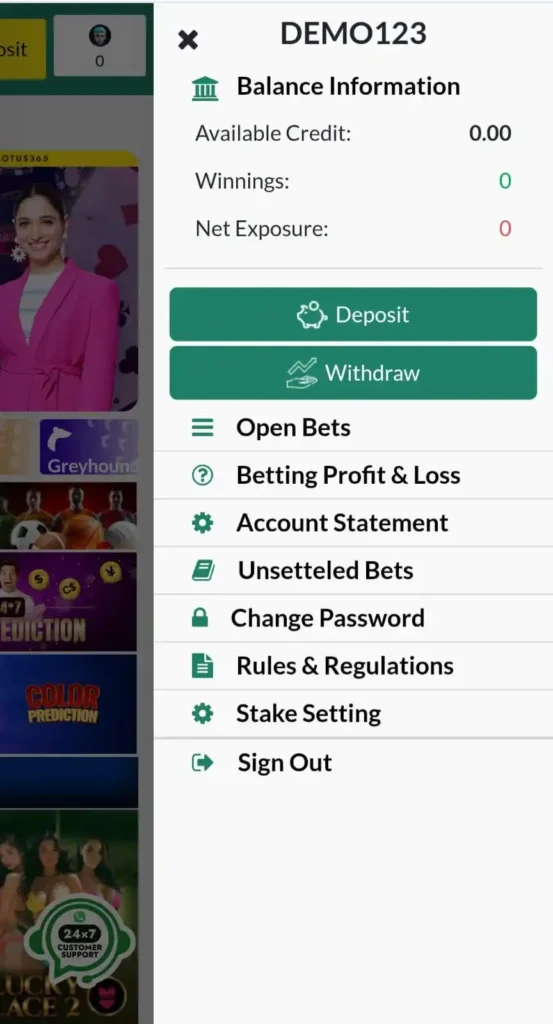
After you log in, you’ll be taken to the Lotus365 login dashboard, which has:
Gaming Choices: – Sports Betting: Betting on cricket, football, tennis, horse racing, and greyhound racing – Casino Games: A casino lobby with a variety of card games and slots
- Live Features: Sports Book and Live Prediction choices
- New Launches: Games like Chicken Road Cross, Stairpong, and Rock Paper Scissors were highlighted.
More Features: – Daily Unlimited Winnings: Offers for regular players – Celebrity Endorsement: The platform has brand ambassador promotions
- Easy-to-Use Interface: The layout is clean, and it’s easy to move between different game types.
Important Safety Tips
Protect Your Account – Use Strong Passwords: Make passwords that have a mix of letters, numbers, and symbols. – Don’t Share Credentials: Don’t give anyone your login information. – Regular Updates: For better security, change your password every now and then. Always make sure you’re on the official Lotus365 website.
Check for Authenticity – Official Website: Always use official channels to get to Lotus365 login
- Check the URL: Check that the website URL is correct and safe (https). Be careful of fake login pages and links that look strange.
Fixing Common Login Problems
Problems with Accessing Your Account – Wrong Credentials: Please ensure that your username and password are correct. – OTP Issues: If you do not receive the OTP, please ensure your network is functioning properly and try again. If your account is locked, If your account appears to be locked, please contact customer service.
Technical Problems – Browser Compatibility: For the best experience, use the most up-to-date browsers. – Clear Cache: If you have trouble loading, clear your browser cache. – Network Connection: Make sure your internet connection is stable.
Access on Mobile
The Lotus365 platform works best on mobile devices, so users can: – Use all login features on their smartphones
- Get OTP messages right away – Use mobile browsers to easily navigate the dashboard – Have the same gaming experience on all devices
Frequently Asked Questions (FAQ) – Lotus365 Login
1. What should I do if I forget my Lotus365 password?
If you forget your password, click the “Forgot Password?” link on the login page. Enter your registered mobile number, select your country code, and click “Get OTP”. Use the OTP sent to your phone to reset and create a new password.
2. Can I log in to Lotus365 using my email or phone number?
No, you must use the username you created during registration to log in. Email addresses or phone numbers are not accepted in the username field.
3. What are the password requirements for Lotus365?
Your password must be alphanumeric and contain more than six characters. For better security, use a mix of uppercase and lowercase letters, numbers, and symbols.
4. Why am I not receiving the OTP when trying to reset my password?
- Ensure your mobile network is active.
- Double-check that you have entered the correct country code and phone number.
- If the problem persists, try again after a few minutes or contact Lotus365 login customer support.
5. Is the Lotus365 platform accessible on mobile devices?
Yes, Lotus365 is fully optimised for mobile users. You can access all login features, receive OTPs, and enjoy the same gaming experience on your smartphone or tablet as on a desktop.
Final Thoughts
The process of logging into Lotus365 login is simple and straightforward for users. The platform’s password recovery system makes sure that you can get back into your account quickly even if you forget your credentials. All you need is your registered mobile number.
No matter if you’re using the platform to bet on sports, play casino games, or make live predictions, the login process is always the same and safe. The clean design and step-by-step instructions make it easy for people of all skill levels to use.
Always put the security of your account first by using strong passwords and keeping your login information private. This full guide should help you get into your Lotus365 login account without any problems and enjoy all the different games you can play on the site.
Are you ready to begin? To get to your account and see all the fun online gaming and betting options, go to the official Lotus365 website and follow these steps.